| .. | ||
| assets | ||
| include | ||
| .component_hash | ||
| .gitignore | ||
| CMakeLists.txt | ||
| dns_server.cc | ||
| idf_component.yml | ||
| README.md | ||
| ssid_manager.cc | ||
| wifi_configuration_ap.cc | ||
| wifi_station.cc | ||

ESP32 WiFi Connect
This component helps with WiFi connection for the device.
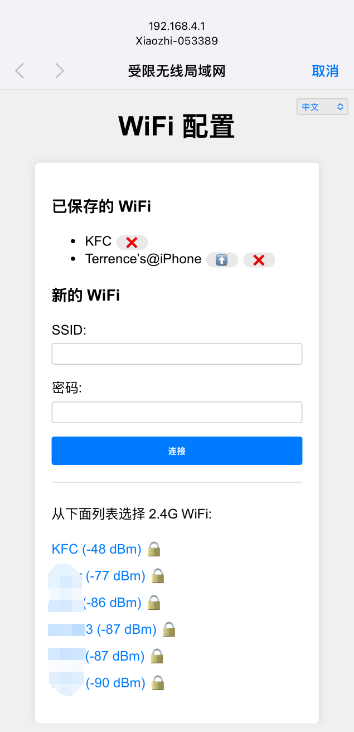
It first tries to connect to a WiFi network using the credentials stored in the flash. If this fails, it starts an access point and a web server to allow the user to connect to a WiFi network.
The URL to access the web server is http://192.168.4.1.
Here is a screenshot of the web server:
Changelog: v2.3.0
- Add support for language request.
Changelog: v2.2.0
- Add support for ESP32 SmartConfig(ESPTouch v2)
Changelog: v2.1.0
- Improve WiFi connection logic.
Changelog: v2.0.0
- Add support for multiple WiFi SSID management.
- Auto switch to the best WiFi network.
- Captive portal for WiFi configuration.
- Support for multiple languages (English, Chinese).
Configuration
The WiFi credentials are stored in the flash under the "wifi" namespace.
The keys are "ssid", "ssid1", "ssid2" ... "ssid9", "password", "password1", "password2" ... "password9".
Usage
// Initialize the default event loop
ESP_ERROR_CHECK(esp_event_loop_create_default());

// Initialize NVS flash for WiFi configuration
esp_err_t ret = nvs_flash_init();
if (ret == ESP_ERR_NVS_NO_FREE_PAGES || ret == ESP_ERR_NVS_NEW_VERSION_FOUND) {
    ESP_ERROR_CHECK(nvs_flash_erase());
    ret = nvs_flash_init();
}
ESP_ERROR_CHECK(ret);

// Get the WiFi configuration
auto& ssid_list = SsidManager::GetInstance().GetSsidList();
if (ssid_list.empty()) {
    // Start the WiFi configuration AP
    auto& ap = WifiConfigurationAp::GetInstance();
    ap.SetSsidPrefix("ESP32");
    ap.Start();
    return;
}

// Otherwise, connect to the WiFi network
WifiStation::GetInstance().Start();